Thursday, April 19, 2007

'Smart dust' to explore planets

By Paul Rincon
Science reporter, BBC News, Preston

Ice in a crater on Mars  Image: European Space Agency
Sand grain-sized particles could ride on Martian winds
Tiny "smart" devices that can be borne on the wind like dust particles could be carried in space probes to explore other planets, UK engineers say.

The devices would consist of a computer chip covered by a plastic sheath that can change shape when a voltage is applied, enabling it to be steered.

Details were presented at the National Astronomy Meeting in Preston.

Dr John Barker, from the University of Glasgow, said the particles could use wireless networking to form swarms.

The idea of using millimetre-sized devices to explore far-flung locations is nothing new, but Dr Barker and his colleagues are starting to look in detail at how it might be achieved.

The professor at Glasgow's Nanoelectronics Research Centre told delegates at the Royal Astronomical Society gathering that computer chips of the size and sophistication required to meet the challenge already existed.

Smart dust could be packed into the nose cones of planetary probes and then released into the atmospheres of planets, where they would be carried on the wind. For a planet like Mars, smart dust particles would each have to be the size of a grain of sand.

By applying a voltage to alter the shape of the polymer sheath surrounding the chip, dust particle could be steered towards a target, even in high winds.

The swarm

The polymer sheath surrounding the computer chip could be made to wrinkle or flatten out.

Wrinkling the plastic sheath would increase the drag on the particle, lifting it higher on the wind. Flattening out the sheath would cause the particle to plummet.

Wireless networking would allow these particles to form swarms, and Dr Barker's team has carried out mathematical simulations to see how this would work.

"We envisage that most of the particles can only talk to their nearest neighbours but a few can communicate at much longer distances.

"In our simulations, we have shown that a swarm of 50 dust particles can organise themselves into a star formation, even in turbulent wind."

The ability to fly in formation would allow the processing of data to be spread, or "distributed" between all the chips, and a collective signal to be beamed back to a "mothership".

Small sensors

Scientists have already demonstrated smart dust that crams sensors, power sources, digital communications and processing circuitry into a volume of a few cubic centimetres.

If they were to be used for planetary exploration, smart dust particles would have to carry sensors. But current chemical sensors would be too large to be carried on particles the size of sand grains.

The scientists hope the pace of miniaturisation will make smaller sensors available in coming decades.

"We are still at an early stage, working on simulations and components," said Dr Barker.

"We have a lot of obstacles to overcome before we are even ready to physically test our designs."

Many other applications have been proposed for smart dust. One idea is to use particles to gather information on battlefields. Another idea involves mixing the particles into concrete to internally monitor the health of buildings and bridges.

Your blog , your space

This is one of a six-part series on key WEB 2.0 technologies.

Blogging

About 10,000 new blogs are created every day. I would like to say that it should give you a picture of what's going on in cyberspace but that would be a gross understatement. Of all of the Web 2.0 mediums, blogging has made the biggest impact. They are almost as good as a personal website, far simpler to set up and as easy to use as email. Even though I can't honestly discount the possibility that there may be a few bloggers out there who have hidden agendas for world-domination, blogging has become the phenomenon that it is today simply because a healthy proportion of bloggers out there have something interesting to say.


As a method of getting your writing and ideas in front of an audience of potentially millions, there are few methods more effective than blogging. Even though hardcore bloggers will demand that a blog be updated at least once a week, your blog is your space to say what you want, when you want and the way you want. You need not be a great writer to have an active and popular blog, because blogs these days can have audio, video and pictures – making them versatile tools for self expression, irrespective of your medium of expression.

The key advantage of a blog is that you need not know a single HTML tag to be able to customise your blog and to start posting even though a little bit of technical know-how and common sense will take you an extra mile or two. And when it comes to posting, you can even email pictures and videos to your blog to post them instantly. It is no wonder that such pictures and mobile-phone captured videos published on the "blogosphere" (I promise that's the last time I am going to use that word!) became the first and most intimate accounts of the tsunami catastrophe and even from the scenes of terrorist attacks.

Most of us bloggers will only ever need the functionality and ease of use that a Blogger.com account offers, but for the more tech-savvy who are looking for more than just a personal Blog would find many uses for the professional features offered at Wordpress.com for free. There are also other free and paid blog services offered by different providers, but for all practical intents and purposes, Blogger and Wordpress can match up to any of them.

So how do you get yourself a blog? Well, first ask yourself whether you have anything interesting to say or show. If you do, read on to find out how you can become a blogger in another 20 minutes.

Try and make sure that you have a general theme for your blog – an idea about what you want it to be. It can literally be about "anything and everything" if you want it to be so.

Then go to http://www.wordpress.com/ (we will be using Wordpress.com in this example, but you may choose Blogger.com or any other blog service of your choice. Note that Blogger.com now requires that you have a Google account before you can sign up for a free account) and click on "Start a Blog in seconds" and even though that promise is not positively an honest one, you can still get your blog in 'minutes' but following the simple instructions on the site.

You can host your blog with most providers for free, or if you already have a registered domain, it is quite simple to direct your blog to the registered URL.

If you host your blog on your own specified server other than that of your blog provider, you may almost certainly have to download a piece of software from your provider and install it on your web-server before it can host your blog.

You can customize the look and feel of your blog by choosing a theme, the sidebar arrangement, by adding external links, changing the header image, adding RSS feeds and so on.

Perhaps you may want to circulate your blog only among your friends or you may want to advertise your blog and draw in as many visitors as possible.

To get the mildly offensive advice out of the way; the key to making your blog popular is by having something interesting to say. If the popularity of your blog is important to you, then you can also promote it on 'democratic news' or 'social book-marking sites such as Digg, del.icio.us or Furl (we will talk about these in the coming weeks) and also promote it on Blog tracking services such as Technorati. If the contents of your blog is targeted at a Sri Lankan audience, you can submit it to community blogs such as http://moju.lk/ or http://www.kottu.org/ Also make an effort to engage yourself constructively in blogger communities by commenting on blog posts that interest you and sharing thoughts and ideas with others who may be able to appreciate your input. Make sure you are polite and courteous towards other bloggers and respectful of the right of others to hold opinions that may not only be different but opposite and sometimes even offensive to you.

Techno Page welcomes bloggers to write in with their thoughts, ideas and any information they want to share. Please forward your epistles to technopage@gmail.com

Tuesday, April 17, 2007

Cell phones, text-messaging revolutionalize conservation approaches

Cell phones have been adopted at a pace unmatched by any technology in the history of mankind. While conventional use of these devices continues to be the expand, mobile phones are also increasingly being viewed as tools for conservation and development.

Ken Banks, currently a Visiting Fellow on the Reuters Digital Vision Program at Stanford University, understands this well. Banks established kiwanja.net as hub for the latest information on how technology, in particular mobile phones, can be applied to tackle issues of economic empowerment, conservation, education, human rights and poverty alleviation.


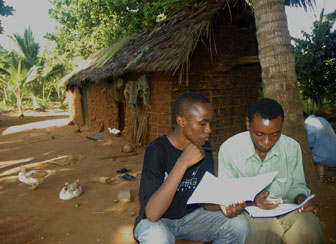
Preparing a conservation plan in Kenya. Courtesy of the Kiwanja mobile image gallery
Banks says that the development of low-cost handsets and the spread of second-hand phones into emerging markets like South Asia and Africa – one of the fastest growing markets with well in excess of 125 million subscribers – is generating a revolution in how organizations approach conservation projects. Mobile phones offer these groups new ways to engage stakeholders, while reducing overhead costs and inefficiencies. The technology can even allow them to track animals, protect parks, and conduct surveys in some of the world's most remote forests.

In April 2007 Banks spoke with mongabay.com about his work.


Mongabay: How did you become involved with applying mobile technology to conservation and development?

Banks: Originally I was in the information technology (IT) industry but my mother and grandparents have always been very keen on nature and the environment. I must have inherited the family gene for nature because ever since I was a child I've been fascinated by the outdoors.


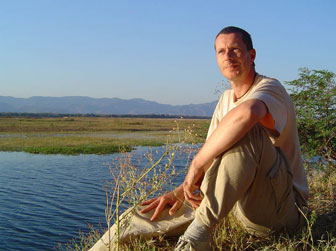
Ken Banks in Mana Pools, Zimbabwe
The experience that really cemented my interest in conservation and development was a trip to Zambia in 1993. I was awarded a place on a Jersey Overseas Aid project where I helped build a school. While I was there, I started to think about where all the aid money was going and why it didn't seem to be particularly effective. I began to look at the practical side of conservation and development efforts, when previously my interest had been primarily in wildlife - the kind of stuff you saw on David Attenborough's shows and other TV programs. In 1995 I went back to Africa to help build a hospital in Uganda. By then I was really quite captivated and I knew it was something I wanted to be involved in.


Mongabay: So it sounds like your first foray into this kind of work was from a humanitarian angle?


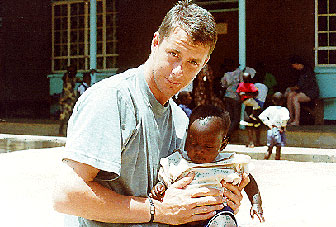
Banks with an infant during his overseas aid trip to Uganda, in 1995
Banks: Well yes, these were the opportunities that were available to me at the time from a foreign standpoint. In Jersey the IT company I was working for had Jersey Zoo among their clients, now known as Durrell Wildlife. During my 3 to 4 years involvement there, I got very interested in conservation from a developing country standpoint - not just what was going on in Jersey but the wider global issues. It gave me the opportunity to tap into some of the real leaders in the field and see captive breeding and habitat conservation programs firsthand. I also benefited from the excellent learning center at Durrell, where they train conservation workers from developing countries in the latest conservation techniques. It's through these experiences that my IT background really began to blend into conservation and development work. It was a great time and I was very fortunate to have experienced it.


Mongabay: When did you go off on your own?

Banks: I left my job in Jersey in 1996 to go the University of Sussex to pursue a degree in Social anthropology with development studies. I sold everything I owned at that point and left for the UK with two suitcases. That was the beginning of the journey. I formed kiwanja.net in 2003 after I returned from a year working with primates in Nigeria.


Mongabay: What is it that you do through kiwanja.net?

Banks: kiwanja.net helps local, national and international nonprofit organizations make better use of information and communications technology in their work. While the site is more of an information resource, I generally function as an intermediary between the technology - especially mobile technology - and conservation or development groups. You'll see organizations like the Gates Foundation looking at technology use in developing countries. I help put them in contact with people in the field as well as some of the technology and applications under development. Part of what I do is match-making in a sense. I have also developed mobile applications for use in conservation and development, such as FrontlineSMS.


Mongabay: What advantages do mobile technologies offer conservation and development groups?


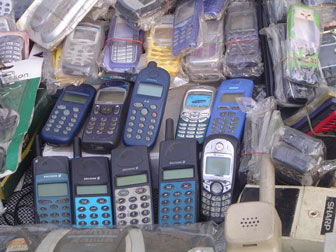
Cheap mobile phones are now sold in markets all over the world. Courtesy of the Kiwanja mobile image gallery
Banks: While large numbers of organizations have been trying to promote the spread of the Internet in rural parts of developing countries, penetration rates are still pretty low in many areas. Mobile phones, however, have been spreading rapidly and today are nearly ubiquitous in some countries, leapfrogging the number of land lines in a matter of 3 or 4 years. We now have a situation where even if people don't themselves own a cell phone, they can easily find access to one through another member of the community, or through various Village Phone schemes.

Because of their widespread adoption, we are now seeing mobile phones being used for many conservation and development applications. Many center around improving communication between stakeholders and NGOs - for example, sending out alerts on impending natural disasters like tsunami and hurricanes, or wildlife alerts, or posting job openings or health messages. The advantages of text messaging is that it is very quick, generally cheap, and direct. Most people read the text messages they receive, unlike spam. It also works on every phone regardless of form factor - a critical issue in areas where a lot of the phones can be as much as 5 to 7 years old. These phones are often useless for surfing the Internet but they work fine for SMS.

As for conservation applications, I focus on the improved communication capabilities. Unlike in the past where you had government agencies evicting people from their land in order to set up protected areas, today it is realized that conservation efforts must involve local people, otherwise you only disenfranchise them and drive them to oppose conservation efforts. Now with the rise of community-based conservation and integrated conservation and development projects, communication can reduce these issues - mobile phones allow us to open channels that were never before possible. For example, in Kruger National Park (South Africa), the park management used to have to send a Land Rover out to the 18 different communities living around the park to inform them of meetings, give them latest news, and so on. If a meeting was canceled or changed, the ranger had to go back out. It might take days to spread the world. Today it is possible to simply broadcast a text message. We can even set up a database that captures text responses from various communities on whether they will be able to attend or how they would vote on a particular initiative. This functionality frees up a lot of resources for more meaningful and productive activities from both the parks' and community's perspective.

Organizations are also finding that mobile phones can serve as an activism tool. SMS messaging can be used to organize petitions and plan demonstrations. In fact, the tool is so powerful that it is even a concern for repressive governments. In recent elections in both Cambodia and Iran the government shut down messaging servers to prevent demonstrators from organizing and campaigning. They didn't want to take any chances after what happened in Ukraine, where the Orange Revolution may not have been possible without text messaging services, and the Philippines, where President Estrada was toppled by gatherings organized by text messaging campaigns.

In Zimbabwe journalists are now using text messaging to distribute news since President Robert Mugabe clamped down on e- mail and shortwave broadcast media.


Mongabay: It sounds like most of these applications are top-down approaches. Are the examples of user-generated content?


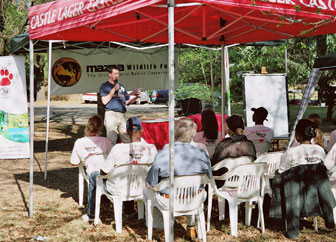
Banks discussing technology use at Johannesburg Zoo in 2005
Banks: Definitely, but it's in the early stages in many cases. The release of my FrontlineSMS system is an attempt to bring the technology into hands of the users, and to promote more of a bottom-up approach. In terms of user-generated content, current 'hot' applications include SMS blogging, which really blossomed during last year's Israel-Lebanon conflict. We saw news being generated by SMS messaging as Beirut was getting bombed. The real-time nature of the posts provided insight on what was really happening on the ground. This type of reporting - citizen journalism - is very much technology driven and the BBC, for example, regularly request people near the thick of the action, particularly with camera-phone images or mobile video, to send them in.

From a conservation perspective, mobile phones are increasingly used for surveys and monitoring. In Kenya, for example, Save The Elephants are using GPS/GSM collars to track elephants. Compared to the alternatives it's cheap, real-time, and doesn't depend on ARGOS satellites which drives up complexity and costs. These devices not only help the organisation understand how elephants use their environments, but it also provides farmers and villagers with an early-warning system so they can protect crops from being eaten and trampled. Human elephant conflict is still a big issue in many countries. In South Africa, a wireless animal tracking system provided by African Wildlife Tracking helps researchers track wildlife in game reserves. Once fitted with a tracking device, text messages are sent to the device to pinpoint the longitude and latitude of the animal. Again this is much simpler and cost-effective than involving multi-million dollar satellites, or more time-consuming VHF tracking systems.


Mongabay: What are the biggest challenges to your work?

Banks: The big problem I see is that people are generally reluctant to share. It's hard to find examples of mobile phone applications for conservation so you see a lot of wheel-spinning and duplication. The mobile phone is being touted as the device that will bridge the digital divide, so there should be more collaboration between organizations trying to address these important issues. You know, how many 'ICT for development' portals do we need? Rather than going it alone, I think peoples' first instincts should be to look at collaboration wherever possible.


Mongabay: So this is where you come in with kiwanja.net?


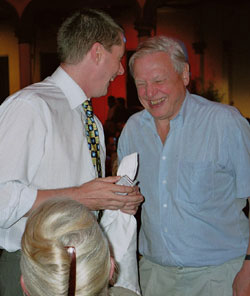
Banks with renowned British naturalist, Sir David Attenborough
Banks: Yes, kiwanja is developing into a bit of an information hub for the latest news on applying mobile technology to conservation and development, and crucially for me this has been needs-driven by the community, not something that I think is needed. The mobile applications database contains details of more than 200 projects from around the world that use mobile technology in fields including human health, economic empowerment, conservation, education, human rights and poverty alleviation, and it is growing all the time. I get emails from researchers telling me how valuable it has been in their work. There is also an image gallery showing mobile technology in action in developing countries. Again, I was concerned about the lack of images which many non-profits needed for campaigning literature, project proposals, websites and so on. Before that, most of the good images I was finding came at a price, whereas mine are free to use. Openness, sharing and transparency are key pillars of my work.


Mongabay: How are mobile phones used for health?

Banks: In Nigeria and India we are seeing government agencies and NGOs use SMS as a health education messaging application. There are also groups using mobiles and mobile networks for disease surveillance. What just a few years ago took three months to report is now almost instantaneous. Spreading the word of outbreaks in remote areas saves lives.

One interesting health application is the SIMpill which helps with the problem of people not finishing their course of antibiotics. This of course only produces drug-resistant strains that are more difficult to treat. SIMpill is an SMS-enabled pill bottle which, when opened, delivers a text message to a central server. Each SMS is time stamped and kept as a record of the patient taking their medication. The doctor is warned via text message if the patient is not taking their medication properly.


Mongabay: In what other ways can SMS and mobile telephony be used in conservation?

Banks: We are seeing SMS used in both fundraising and awareness-raising campaigns and for more conservation-specific applications.


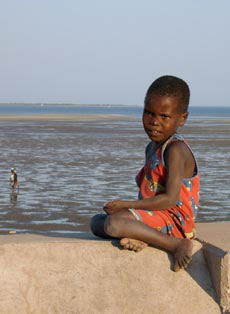
Girl in Mozambique. Photo by Ken Banks.
One project I was heavily involved in was wildlive! , a service which promoted global conservation by providing news and information on various issues through peoples' handsets. It also had a direct fundraising angle through the sale of conservation-themed wallpapers, ringtones and games. Funds raised went to Fauna & Flora International, a UK-based organization, and directly to the conservation projects being promoted.

In Sumatra, tiger researcher Debbie Martyr kept a live field diary that was broadcast via a mobile internet site. Her experiences included live sting operations which used camera-phones to capture poachers and illegal fur traders in action.

In the Okapi Wildlife Reserve of the Democratic Republic of Congo, satellite phones enable patrols to text message their GPS location along with a short message from anywhere in the Reserve. The base operator can then call the patrol teams in an emergency, resulting in a much quicker response to threats to the Reserve.


Mongabay: What do you think about the Amazon Conservation Team's (ACT) project in the Amazon which uses GPS and Google Earth to map tribal lands and protect the forest against illegal encroachment? It's not mobile technology but it seems to have some parallels.


Amazon natives use Google Earth, GPS to protect rainforest home.
Deep in the most remote jungles of South America, Amazon Indians (Amerindians) are using Google Earth, Global Positioning System (GPS) mapping, and other technologies to protect their fast-dwindling home. Tribes in Suriname, Brazil, and Colombia are combining their traditional knowledge of the rainforest with Western technology to conserve forests and maintain ties to their history and cultural traditions, which include profound knowledge of the forest ecosystem and medicinal plants. Helping them is the Amazon Conservation Team (ACT), a nonprofit organization working with indigenous people to conserve biodiversity, health, and culture in South American rainforests.
Banks: ACT's project is very interesting. What makes it particularly exciting from my perspective is that it is very anthropological. Conservation is not just about working with wildlife, it's also about working with people so anthropology, with its human-centred focus, is of particular relevance. For many people it's still not an obvious fit, particularly when technology is involved. I've been speaking at companies, workshops and conferences a lot about this lately.

What I really like about the ACT project is that it's needs-driven, based on needs of the local people, not donors. The users - in this case the Amazonian tribes - see the relevance of the technology so they embrace it, and the technology fits in seamlessly with what they are trying to achieve. More remarkable is that the program also promotes cultural preservation in a climate where culture loss is a serious concern.

Did you see the announcement on the Darfur features added to Google Earth this week? What we are seeing is the creation of "communities of consciousness" that develop an interest and awareness in the human stories behind events. It's a great way to build strong support for an issue. I think ACT could do a similar thing if the tribes wanted to post up some of their sacred stories so that the general public could get a better understanding of their history and culture. It could serve as a rallying point for their concerns over forest development. Maybe they're already doing this.

While there are always concerns over whether technology will drive people away from their traditional lifestyles, in cases such as this technologies can provide new opportunities whilst allowing people to continue to live in traditional ways. As Mark Plotkin at ACT has said, it's the best of both worlds.


Mongabay: What are your thoughts on the "One Laptop Per Child" (OLPC) initiative that provides low-cost (i.e. $100), durable laptops to children in developing countries?


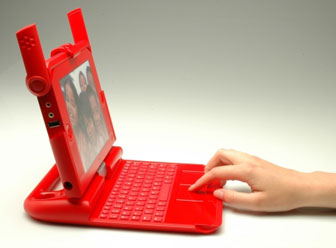
The $100 laptop. Photo courtesy of One Laptop per Child.
Banks: I think it is an interesting experiment - which is basically what it is - but the jury is still out on OLPC. Personally I have problems more with the process than the product. One of the best arguments I've heard on why it has the potential to be ethically problematic is that you are asking some of the world's poorest countries to foot the bill for what is essentially a prototype. These governments will be spending hundreds of millions of dollars each, up front, to fund an unproven technology. It is fraught with risk and on a production scale that has never been attempted before in the ICT for development field. While it may turn out that these concerns are totally unfounded, it seems like an expensive way of "having a go" - especially for governments least able to afford it. Comparably, if you look at the mobile phone it is ubiquitous, cheaper, and less complex. We're seeing more companies and organizations developing emerging market handsets based on 2, 3 or 4 years of real-world experience. You can't say that about OLPC. OLPC can't really compare itself to anything, although OLPC 2.0 (if I can call it that!) would be able to.

But, to be fair, OLPC might well be a revolution - I'm not trying to knock the project. You have to credit the developers for going out there and trying to do something bold for the benefit of humankind.

Interestingly, India actually turned down the project. Instead, it is evaluating home grown technologies (called NetTV and NETPC), which begs the question of whether a single product can really work on a global scale in emerging markets. The world is not homogenous and technology definitely needs to be tested out in the field. I've often seen a disconnect between technology developers and the real-world use of their products. At a recent conference I attended in India for W3C, there was very little emphasis on the user - it was all about the technology. There's a big difference between how something is used in an airport lounge and how well it might work in a remote village with limited power supply, 100-degree heat, dust storms and a semi-literate user. For many developers, how their technology works in an emerging-market context is generally an after-thought.

In the places where I work, it is the first question I tend to ask.

Ken Banks is currently a Visiting Fellow on the
Reuters Digital Vision Program at Stanford University.

Use HTML to Open a Link in a New Window

Don't you hate it when you click a link on a page and up pops a new window. Even worse, you leave a site and up pops a window reminding you to come back soon, or visit their sponsor or whatever.

Why do they do that? If it's so irritating, then why am I going to show you how to do it?

In fact it's a very useful technique and, used sparingly, can be helpful to your visitors. One of its main uses it to avoid 'losing' a visitor. For example, in the middle of one of your pages you have a link to another site. Your visitor follows the link... and doesn't come back. You've lost them!

Web designers overcome this problem in all sorts of ways. They sometimes put all their external links on a separate page - not very helpful for the visitor but they are less likely to go until they have finished with you. Another technique is to use frames - the visitor clicks a link which then opens in a separate frame on the same page so that they view the other site from within yours. But lots of people don't like frames - it might make it difficult for them to 'escape' from your site, and they might not know how to 'bookmark' the new site. Perhaps frames just don't suit the design of your page.

The answer is of course... a new window!

New Windows with HTML

Forcing a link to open in a new window is simply a matter of adding an additional attribute to the link's code. Suppose you have a straightforward link to a page. The visitor sees something like...

Visit Fontstuff today!

Here's the code...

Visit Fontstuff today!

Now let's modify the link to force it to open the linked page in a new window. What the visitor sees is no different...

Visit Fontstuff today!

...but when they click the link a new browser window opens displaying the linked page inside. Here's the code...


Visit Fontstuff today!

The addition of the TARGET attribute to a hyperlink lets you dictate where the linked page opens. To open a new page I have used target="_blank" but there are others...

target="_blank" Opens the linked page in a new window.
target="_self" Opens the linked page in the same window. This is the default for ordinary pages and doesn't need to be specified. It has a use when working with frames.
target="_parent" Opens the linked page in the parent frame in a frames page.
target="_top" Opens the linked page in a full (i.e. top level) window when used in frames pages. This one is useful for letting a linked page 'break out' of a frame.

In fact, you can insert any window name that you might have defined elsewhere. Using the JavaScript technique outlined below you could create a new window with a particular name, then use this method to cause all subsequent linked pages to open in it. (Find out how to do this and check out the demo!)

Setting a Default

If you want all the links on your page to open in a new window you don't have to modify every one. It's a simple matter to apply a default setting for the page so that all the links behave the same way. Here's how...

Insert the following code...

<

...into the header of your document's HTML (i.e. anywhere between the and tags but not inside any other pairs of tags already there). You can substitute "_blank" with one of the other names if appropriate.


How FrontPage Does It...

FrontPage 2002, FrontPage 2000 and FrontPage 98

Select the text you want to hyperlink (or the link you want to edit) and choose Insert > Hyperlink. In the Edit Hyperlink dialog box find Target Frame: and click the Change Target Frame button. The Target Frame dialog box offers a list of common targets, or you can enter your own. For a new window select New Window and you'll see _blank appear in the Target Setting box. Click OK twice and it's done.

To set a default, check the Set as page default box and all links on that page will work the same way.

If you have already made your hyperlinks, you can quickly set the default from the Page Properties dialog box. Choose File > Properties (or right-click on the page and choose Page Properties...) and on the General tab find Default Target Frame. Click the Change Target Frame button and proceed as described above.

FrontPage Express

Select the text you want to hyperlink (or the link you want to edit) and choose Insert > Hyperlink. In the Edit Hyperlink dialog box click in the Target Frame: box and type "_blank" (without the quotes). Click OK.

To set a default target for all the links on the current page choose File > Page Properties (or right-click on the page and choose Page Properties...). Find Default Target Frame and enter the target name as above.


For complete control over how and where your new window appears you can use JavaScript. Take a look at the article on Opening New Windows with JavaScript.

Bookmark Bliss: The Developer Cheat Sheet Compilation

This is a post I put together a few months back for one of my friends blogs before I got started doing things myself. I guess he wasn’t much for blogging longevity and sort of gave up before he even began. Like my article on 50 sources for web design inspiration, this list comes primarily from my years of accumulated bookmarks. I think this article was a great resource though and is one I think Fuzzy Future readers will be interested in, so I decided to post it here as well so it didn’t go extinct. I’ve added some new stuff I’ve found since the original posting so hopfully this is as useful to you as it has been for me…

I know personally, I’m not one of those people that can remember every detail of every language without looking things up. It’s nice to have a cheat sheet with a quick summary of some of the most commonly used procedures, tags, tools, syntax, etc, saving time that would have been used to look it up on Google or dig through documentation either online or in printed text. The following is a list of links to several different cheat sheets on a wide variety of tasks and tools. You can print them out and hang them on your wall (my personal choice) or simply bookmark them for easy access down the road. If you have any additional suggestions or see something I’ve missed, let me know…

Command Line

  1. Windows NT/XP Command Line Reference
  2. Bash Command Line Reference
  3. Bash Command Line Programming Reference
  4. DOS Commands

Databases

  1. Firebird SQL Cheat Sheet
  2. MySQL Cheat Sheet
  3. MySQL Reference List
  4. Oracle Cheat Sheet
  5. Oracle PL/SQL Cheat Sheet
  6. Oracle 9i Server Reference (PDF)
  7. Oracle 9i Command Reference
  8. PostgreSQL Cheat Sheet
  9. PostgreSQL Cheat Sheet List
  10. SQL Cheat Sheet
  11. SQL Server 2005 Commands

Programming

  1. Ada Syntax Card (PDF)
  2. ASP/VBScript Cheat Sheet
  3. C++ Language Summary
  4. C++ Reference Sheet (PDF)
  5. C++ Containers Cheat Sheet
  6. C# Language Reference
  7. C# Programmer’s Reference Sheet
  8. Delphi Technical Reference Card (PDF)
  9. Java Syntax Cheat Sheet
  10. Java Quick Reference (PDF)
  11. Java Reference for C++
  12. JSP 2.0 Syntax Reference Sheet (PDF)
  13. LaTeX Reference Card (PDF)
  14. .NET Cheat Sheets
  15. Perl Cheat Sheet
  16. Perl Reference Card (PDF)
  17. Perl Regular Expression Quick Reference (PDF)
  18. Perl Reference Guide
  19. PHP Cheat Sheet
  20. PHP Developer Cheat Sheet
  21. Python 101 Cheat Sheet
  22. Python 2.5 Quick Reference
  23. Python Cheat Sheet
  24. Python Quick Reference (PDF)
  25. Ruby Cheat Sheet (PDF)
  26. Ruby on Rails Cheat Sheet Collectors Edition
  27. Ruby Reference
  28. Ruby on Rails Reference Sheet

Unix/Linux

  1. Debian Linux Reference Guide (PDF)
  2. Linux Shortcuts and Commands
  3. One Page Linux Manual (PDF)
  4. TCP Ports List
  5. Treebeard̢۪s Unix Cheat Sheet
  6. Unix Command Line Tips

Web Development

  1. Actionscript 2.0 Cheat Sheet (PDF)
  2. Actionscript 3.0 Cheat Sheet (PDF)
  3. Cold Fusion Cheat Sheet
  4. CSS Cheat Sheet
  5. CSS 2 Reference Card (PDF)
  6. CSS Reference Sheet
  7. CSS Shorthand Guide
  8. CSS Useful Properties
  9. Drupal 4.7 Cheat Sheet
  10. .htaccess Cheat Sheet
  11. HTML Cheat Sheet
  12. HTML Dom Quick Reference Card (PDF)
  13. Javascript Cheat Sheet
  14. Javascript Quick Reference
  15. Javascript Reference Page * No Longer Available
  16. JQuery Cheat Sheet (PDF)
  17. JQuery Reference (PDF)
  18. JQuery Visual Map
  19. Mod_Rewrite Cheat Sheet
  20. Scriptaculous Combination Effects Field Guide (PDF)
  21. XHTML Cheat sheet
  22. XHTML Reference
  23. XHTML & HTML Cheat Sheet
  24. XML Syntax Quick Reference (PDF)
  25. XML Schema Reference (PDF)
  26. XSLT and XPath Quick Reference (PDF)

Miscellaneous Topics

  1. Ascii Codes Cheat Sheet
  2. CVS Cheat Sheet
  3. EMacs Keyboard Shortcut Reference
  4. Regular Expressions Cheat Sheet
  5. RGB Hex Colour Chart
  6. Subversion Quick Reference (PDF) * No Longer Available
  7. Theoretical Computer Science Cheat Sheet (PDF)
  8. UML Quick Reference Card (PDF)
  9. UML Cheat Sheet
  10. Vi Cheat Sheet
  11. Vim Commands Cheat Sheet
  12. XEmacs Commands Cheat Sheet

Have you found this list useful? If so, show your support by subscribing to our news feed. We’ve posted several other entries in our Bookmark Bliss series that you might find interesting as well…

  1. Bookmark Bliss: 50 Sources for Web Design Inspiration
  2. Bookmark Bliss: The Developer Cheat Sheet Compilation
  3. Bookmark Bliss: 30 Web Developer Community Forums
  4. Bookmark Bliss: 101+ Stock Image Resources

As always, your comments are welcome and please let us know of any sites we might have missed.

Monday, April 09, 2007

Java Sand Box

A security measure in the Java development environment. The sandbox is a set of rules that are used when creating an applet that prevents certain functions when the applet is sent as part of a Web page. When a browser requests a Web page with applets, the applets are sent automatically and can be executed as soon as the page arrives in the browser. If the applet is allowed unlimited access to memory and operating system resources, it can do harm in the hands of someone with malicious intent. The sandbox creates an environment in which there are strict limitations on what system resources the applet can request or access. Sandboxes are used when executable code comes from unknown or untrusted sources and allow the user to run untrusted code safely.

The Java sandbox relies on a three-tiered defense. If any one of these three elements fails, the security model is completely compromised and vulnerable to attack:

  • byte code verifier -- This is one way that Java automatically checks untrusted outside code before it is allowed to run. When a Java source program is compiled, it compiles down to platform-independent Java byte code, which is verified before it can run. This helps to establish a base set of security guarantees.
  • applet class loader -- All Java objects belong to classes, and the applet class loader determines when and how an applet can add classes to a running Java environment. The applet class loader ensures that important elements of the Java run-time environment are not replaced by code that an applet tries to install.
  • security manager -- The security manager is consulted by code in the Java library whenever a dangerous operation is about to be carried out. The security manager has the option to veto the operation by generating a security exception.

Software Patch Makes Car More Fuel-efficient

Science Daily — A car wastes energy almost continuously. Whether it is running in first, second, or a higher gear, there is only one position of the accelerator that guarantees optimal performance. Accelerating a little less or a little bit more can cause considerable loss of energy. John Kessels has designed a way to save energy by enabling the car to achieve optimal engine performance more frequently. With a relatively small modification it is possible to reduce fuel consumption by 2.6%. Kessels obtained his doctorate from the Technical University Eindhoven (TU/e) on Wednesday February 14, 2007.

Car manufacturers are frequently criticized for failing to reduce fuel consumption. In order to meet the Kyoto objectives, European car manufacturers have agreed to reduce the emission of CO2 for their fleet to 140 grams per kilometer in 2008. Many car manufacturers have not yet attained this reduced emission. Ford is one of them and the company has been diligently searching for a way to further increase the fuel-efficiency of its cars.

Hybrid cars

One way to reduce fuel consumption is to build so-called hybrid cars. In these cars the internal combustion engine is more fuel-efficient because a secondary power source is available: a generator. If the power from the combustion engine exceeds the actual power demand for driving, this generator stores the excess power in the car’s battery. It also works the other way around. The generator can provide extra power if the car needs more power than the combustion engine can provide at optimum performance. Hybrid vehicles thus reduce fuel consumption by 25% or more.

Electric energy systems

Kessels examined the possible savings without using the advanced hybrid technology. He found that excess power can be used to charge the car battery. In addition, the generator, which charges the car battery, can be turned off when it is inefficient for the engine to power it, which leads to reduced fuel consumption. The car can also brake electrically, generating energy, which can be stored in the battery. Finally, he found that it is possible to partly shut off the electric energy systems, such as rear window and seat heating, for further improvement of the power supply system.

Software patch

With his new method Kessels can achieve a total fuel savings of 2.6%, without having to replace any of the parts of the car. Simply uploading a software patch to the car’s computer and adding one single small cable suffices. If it were possible to shut the engine off when it is idle, a savings of 5 to 6% could be achieved. This, however, would require significant adjustments to the car, including installing a more powerful starter motor and an automatic gearbox.

Note: This story has been adapted from a news release issued by Eindhoven University of Technology.

Sunday, April 08, 2007

Adobe Systems Inc. on Jan. 29 announced that it has released the full PDF (Portable Document Format) 1.7 specification to AIIM, the Association for In

Q&A:Adrian Ford, CTO of Global Graphics, explains the specification that Microsoft is developing with his company's help.


Adrian Ford At the WinHEC keynote in April, Microsoft Corp. founder Bill Gates previewed Metro, the company's next-generation, XML-based, electronic-document initiative that is expected to become available at around the same time Windows Longhorn is released.

In conjunction with Microsoft's announcement of Metro, UK-based software company Global Graphics announced that for the last two years it has been working closely with Microsoft to develop Metro's specifications. At WinHEC, Global Graphics demonstrated ways in which the printing industry might make use of Metro once it becomes available.

Recently, PDFzone sat down with Dr. Adrian Ford, Global Graphics' chief technology officer, to discuss Metro's functionalities and his company's involvement with its development.

PDFzone: Please give us an overview of Metro.

Ford: Metro is really three different things in one.

First off, it's a new document file format, similar in many ways to PDF.

It's also a spool format. When you print on a Windows or a Mac computer, the print system has a format that it uses to communicate the data through the print subsystem and spool it to the device.

And it's also a page description language, similar to PCL PostScript, that can be used to transmit that information all the way down to a printer, where it turns into the data that comes out on a piece of paper.

In addition to this format, there is also a new printing subsystem. Microsoft announced they're fixing a number of the printing bottlenecks and issues in the current Windows subsystem by implementing a new architecture for printing that includes Metro as a key foundation of that architecture.

PointerClick here to read more about Microsoft's "Metro" and analysts' reactions to the demonstration at WinHEC.

PDFzone: Given that it is expected to become available at the same time as Longhorn, is Metro specifically being designed for Longhorn?

Ford: It's tied to Longhorn, but it's part of what [Microsoft is] calling WinFX. WinFX is going to be available on Longhorn, Windows XP and Windows 2003. So the time scales are the same as Longhorn, but the potential install base is much bigger than the Longhorn platform.

PDFzone: When did Microsoft approach you to work on Metro, and for what reasons do you believe the company wanted to work with you?

Ford: We've been working closely with [Microsoft] since early 2003. One of the reasons they came to us and asked us to help them is honestly because we have a lot of expertise and experience working with other document formats with the products that we have in the PDF space and also with other PDLs [Page Description Languages], our work with PostScript and PDF RIP [Raster Image Processor] products and technology.

We've also got a very wide and broad customer base. Virtually all of our products go out through OEM and ISV channels, where the technology we provide is built into other people's products. So a lot of the industry's problems and issues that they face, we're very aware of what they are.

One of the things we've been able to do, as well as providing our expertise and feedback to that specification, is to bring a lot of industry issues that our partners experience and make sure that they're addressed in the work that Microsoft is doing. And that consultation work is quite a valuable exercise on both sides for making sure this actually does address real-world issues for the print subsystem on Windows.

PointerClick here to read David Morgenstern's take on Metro.

PDFzone: What sort of work are you doing on behalf of Microsoft for Metro?

Ford: We've been doing work to develop a prototype implementation of our Metro high-performance RIP. This is a component that takes Metro documents and converts those into the raster data needed to print them.

We've been doing that for a number of reasons. One of them is so that we can demonstrate with Microsoft and the industry that you can consume this format in a device. And that was part of a demonstration that we were showing at WinHEC.

We've also been working closely with the hardware vendors in that area. It's given us very valuable feedback into the specification, so there's actually a real implementation behind a lot of the feedback that we give Microsoft from the spec itself.

[In addition], we're also taking the core technology that we're developing and making it available as a reference implementation for the print industry. If you have a third party generating Metro documents, there's a reference implementation that can be used to make sure that the implementation conforms with this print reference. That is quite a wide project that we've been working with them on, but that kind of sums it up.

PDFzone: What is Microsoft's motivation for developing Metro?

Ford: Metro is very tightly related to this thing called WinFX. WinFX is a supplementary or replacement set of APIs that will allow people to develop applications in a way that mixes the best of the rich-client approach, the best of an application that runs on Windows today that has a rich user interface, and mix that with the best of a Web-based application, the kinds of things you get from things like Flickr or Google maps or things like that. [Microsoft] can mix those two development paradigms into one way of generating applications.

WinFX [provides] this new user interface for developers, and that user-interface model is the same as the one used in the Metro format. So there's a very tight linkage there between the ways developers can use the API that Microsoft provides to author documents and user interfaces on the platform.

PDFzone: Is Microsoft trying to compete directly with Adobe with its development of Metro?

Ford: That's a question that, in all honesty, has to be directed at Microsoft and Adobe.

PDFzone: How is Metro similar to PDF?

Ford: [Like PDF], you can have a Metro document that sits on disk and that you share with other people and e-mail around, and that document contains all the graphical data and resources and images and fonts and everything else, and supports compression in an efficient container, and people can view that document in a viewer that isn't related to content creation applications. In that sense the format does have similar characteristics with PDF.

Also, if you look at the specifications for PDF and for Metro they have similar functionalities defined within them.

PDFzone: How does Metro differ from PDF?

Ford: It's mainly the usage things that we see as being different between the two. Who's going to use them and where they're going to use them are big questions at the moment, where they're going to be different.

One of the key things about Metro is the use of it within the print subsystem on Windows. There are number of issues and limitations you have to face printing on Windows. The application developers or printer-driver developers have to work extremely hard to make those things work and to bypass these limitations in the print subsystem.

Today you could have an application that understands RGB wide-gamut photo printing, but the application can't send that data through the print subsystem to a printer because that extra information gets lost. So today you often get software that bypasses the print subsystem, and you can't go file to print nice pictures on your Epson printer. There are a number of real issues that Metro solves on the print side that PDF doesn't solve.

PDFzone: How would Metro fix the aforementioned problem? Please elaborate.

Ford: You can buy fairly cheaply a digital camera that supports a wide gamut, greater than 8-bit RGB color, and you can get very cheaply an ink-jet printer that has got a very wide gamut of color reproduction and [obtain] excellent photographic prints from it.

Right now, if you drop that image into Microsoft Word and hit "file-print," you lose all that extended color information because the print path can't handle it. With Metro that format can handle that extended information in the same way that PDF can. You'll be at the printer in the normal way. Many users won't even realize that Metro is being used, they won't care what's under the hood, but they'll get much better quality of the stuff that they print on the Windows platform.

PDFzone: Describe another way in which Metro solves a specific problem.

Ford: Another example would be making PDFs today. Many people make PDFs in the application they are working in, and they print to Distiller or to something else, and what's happening underneath is that the application is printing through the Windows print subsystem through a thing called the GDI [Graphic Device Interface] print subsystem. A print driver converts that to PostScript, and the PostScript gets converted to PDF.

However, there are a number of features that PDF supports that you can't actually get into the PDF files through that route. An example of that is transparency. Applications like PowerPoint and Word in Office 2003 support transparency, but if you try to make a PDF from those, you don't get that transparency information even though PDF can support that transparency.

Metro will enable people like Adobe or Global Graphics to make better PDFs on the Windows platform. So you can see the print subsystem is being improved by the stuff that Microsoft is doing that will enable that information to be passed down and help people make better PDFs than they can today.

An analogy of that is to say that at the moment there's a four-lane highway, and when that [highway] hits the print subsystem, it becomes a single-track road with passing places. Everything slows down, and you don't get as much data through that pipeline. With WinFX coming, it's very clear that the highway is going to get much wider, but the print subsystem is still this single-track road with passing places. So one of the key things that Microsoft is doing [by developing Metro] is bringing the print subsystem up to a point where it can support the stuff that is coming with WinFX.

PDFzone: Which format do you see as being more viable, PDF or Metro?

Ford: From the Global Graphics perspective, we see segments and markets where both these formats are going to be very important and where they have specific strengths either in the format itself or in the platform that supports that format. From our business point of view, we see having to supply technology that supports both platforms across pretty much all markets. There are things that Metro will provide say a corporate user or environment, for example, and there are a number of things that the whole of the Metro initiative—not just the format, but the bits that go with it—will provide that PDF doesn't and will solve problems that PDF doesn't solve. And there are things that PDF provides that Metro won't.


PDF to become an open, ISO standard


Adobe Systems Inc. on Jan. 29 announced that it has released the full PDF (Portable Document Format) 1.7 specification to AIIM, the Association for Information and Image Management. AIIM, in turn, will start working on making PDF an ISO standard.

In this release, Adobe is opening up the full PDF 1.7 specification as defined in Adobe's PDF Reference Manual. According to Sarah Rosenbaum, Adobe's director of product management, this is the next logical step for Adobe with its PDF formats. In the 14 years since Adobe published the complete PDF specification in 1993, PDF has become a de facto global standard for secure and dependable information exchange and archival storage.

Since 1995, Adobe has participated in various working groups that develop technical specifications for publication by ISO, and worked within the ISO process to deliver specialized subsets of PDF as standards for specific industries and functions. Through these efforts, PDF/Archive (PDF/A) and PDF/Exchange (PDF/X) have already become ISO standards, and PDF for Engineering (PDF/E) and PDF for Universal Access (PDF/UA) are well on their ways to becoming ISO standards.

Additionally, PDF for Healthcare (PDF/H) is an AIIM proposed Best Practice Guide. AIIM already serves as the administrator for PDF/A, PDF/E, PDF/UA and PDF/H.

One reason Adobe is releasing the full PDF 1.7 specification at this time is that so many industry-specific versions of PDF already were ISO standards, Rosenbaum explained. "We see a lot of standards based on PDF format that are specific to industries or archiving. That's great, but for customers want to do documents in PDF, submitting the entire specification will make it easier for them," she said.

From here, a joint committee formed under AIIM will identify issues to be addressed, as well as proposed solutions with the proposed standard. This committee will then develop a draft document that will be presented to a Joint Working Group of ISO for development and approval as an international standard.

By opening up PDF in this manner, Adobe's customers will be more easily able to use PDFs in all their document management programs. Additionally, this move will also "provide an umbrella for the current alphabet soup of Adobe PDF standards," Rosenbaum added. Another factor in Adobe's decision was that with the rise of ODF (open document format), "there's a stronger market trend towards standardizing on open standards ... umbrella."

However, this move by Adobe does not, Rosenbaum asserted, have anything to do with Microsoft's PDF competitor: the Metro format, aka XPS (XML Paper Specification) print path.

XPS, which is now available in Vista, at one time was described as a "PDF killer." In Vista, XPS appears as a printer named "XPS Document Writer." If a user prints to this "printer" from an application, the resulting file will be an XPS Document. XPS is also supported in Office 2007.

Kevin Lynch, Adobe's chief software architect and senior vice president of company's platform business unit, stated: "Today's announcement is the next logical step in the evolution of PDF from de facto standard to a formal, de jure standard. By releasing the full PDF specification for ISO standardization, we are reinforcing our commitment to openness. As governments and organizations increasingly request open formats, maintenance of the PDF specification by an external and participatory organization will help continue to drive innovation and expand the rich PDF ecosystem that has evolved over the past 15 years."

Interestingly, this announcement by Adobe comes just one day prior to the Jan. 30 public release of both Vista and Office 2007 by Microsoft.


-- Steven J. Vaughan-Nichols

Related stories:

Open-source Replicator? Home-built 3-D Printer Could Launch A Revolution, Engineers Say


Science Daily — The Altair 8800, introduced in the early 1970s, was the first computer you could build at home from a kit. It was crude, didn't do much, but many historians would say that it launched the desktop computer revolution.


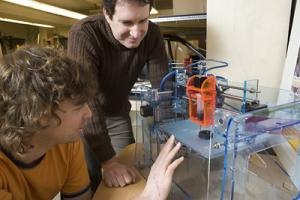
Hod Lipson, assistant professor of mechanical and aerospace engineering, right, and engineering graduate student Evan Malone work with a "Fab@Home" machine in the Computational Synthesis Lab in Upson Hall Feb. 22. On the stage is a Lego tire duplicated by the Fab@Home. (Credit: Lindsay France/University Photography)

Hod Lipson, Cornell assistant professor of mechanical and aerospace engineering, thinks a little machine he calls a Fab@Home may have the same impact.

Some day, Lipson believes, every home will have a "fabber," a machine that replicates objects from plans supplied by a computer. Such devices could change how we acquire common products, he suggests: Instead of buying an iPod, you would download the plans over the Internet and the fabber would make one for you.

Such machines could evolve from the 3-D printers currently used by industrial engineers for "rapid prototyping." They design parts in computer-aided design programs and feed the designs to 3-D printers to make working plastic models. A 3-D printer has a small nozzle that scans back and forth across a surface, depositing tiny droplets of quick-hardening plastic. After each scan, the nozzle moves up a notch and scans again until it has built up the complete object, layer by layer. With multiple nozzles or a means of swapping supply cartridges, the machine can create objects made of many different materials. An electronic circuit, for example, can be made by combining an organic semiconductor, metallic inks and ceramic insulators.

Price tags for these machines average around $100,000, but you can build your own Fab@Home for about $2,300 worth of off-the-shelf parts. The prototype, designed by Evan Malone, a Ph.D. candidate in Lipson's Computational Synthesis Laboratory, is slower than the commercial models, and its resolution, or ability or produce fine detail, is lower, but people are finding practical -- and often unexpected -- uses for it.

Commercial machines can't be modified, which, Lipson says, impedes the progress of the technology, but the Fab@Home is "open source." Anyone can download the plans at http://www.fabathome.org, which is getting about 20,000 hits a day. The site also includes construction hints, ideas for applications, notes on the history of 3-D printing and discussion groups. People are invited and encouraged to make improvements, and a sort of cult is slowly forming.

So far, Lipson says, about a dozen people have said they are building one, and he knows of three that are actually up and running -- two at the University of Washington and one in Innsbruck, Austria. Lipson's group has built several and lent a couple to other researchers.

Some recent developments:

Biologists at Rockefeller University have been using a Fab@Home to deposit slime mold cells in various arrangements to see how the distribution influences their ability to form colony organisms.

The British magazine Auto Express suggests that fabbers could be used to make auto parts, allowing individuals to customize cars in ways that were previously available only to those with large manufacturing facilities.

While the usual expectation is to make solid objects out of epoxy or other quick-hardening plastic, the Fab@Home also can be used with plaster, Play-Doh, silicone, wax (to make forms for casting), low-melting-point metals and a variety of other materials.

Cornell graduate student Dan Periard and Jennifer Yao '08 have been loading commercial frosting into the machine to make cake decorations. It's not frivolous work, Lipson says: Because frosting dissolves in water it can provide temporary support for hollow structures and later be washed away.

A high school student in Kentucky is experimenting with a heated syringe to "fab" with chocolate.

Future fabbing machines will have to shift from one raw material to another in midstream and probably deposit material in three dimensions, not just layers, says Lipson. Research in his lab is taking early steps. Malone has built a machine that uses a rack of interchangeable cartridges to make devices out of several materials at once. So far, it has made a working battery, complete with outer case. Malone's long-range goal is to "print" a complete robot, including limbs, actuators, control circuitry and batteries.

Meanwhile, Lipson says, just as the Altair inspired tinkerers to add disk drives, keyboards and monitors and write operating systems and word processors, perhaps the Fab@Home will inspire new fabbing technology.

Note: This story has been adapted from a news release issued by Cornell University.

Net firms tackle Vista headache

CD being placed in drive, BBC
Some new PC owners have faced problems getting online
Windows Vista is causing problems for some new PC owners hooking up their machine to a broadband connection.

Some old installation discs that simplify the task of configuring a PC for broadband have refused to work on machines loaded with Vista.

One reader was warned by Virgin Media that it would be "weeks" before its software worked with Vista.

Other net service firms have also admitted that the appearance of Vista has caused some hiccups for users.

Disc delays

Microsoft launched the consumer versions of Windows Vista on 30 January and anyone buying a PC since that date is likely to have it installed on their brand new machine.

Many are thought to have suffered the same problem as Swansea-based Rob Evans who found that he could not use his existing Virgin Media account with his new PC from Tesco.

After ringing Virgin for help he was told that Vista support may not be forthcoming for some time.

A spokesman for Virgin Media, formerly NTL/Telewest, admitted that its discs did not yet work with Vista but added that Mr Evans was now using his broadband service.

"We can get people online without the installation disc," he added. "It's not that it does not work, it's just the disc."

The spokesman said that other net service firms were also known to be taking time to get to grips with Vista.

Windows Vista on sale, PA
Microsoft launched Windows Vista to consumers in January
"It's such a big product that to train staff up on it fully and make sure all your services are tested and compliant takes time," he said.

A spokesman for BT said: "I think we are now supporting it though we did have some issues with it."

In particular, he said, Vista was conflicting with the Norton security software that BT sells with some of its broadband bundles.

"That's now been ironed out," he added.

The spokesman said BT had created a help page devoted to Vista to make it easier for people to get their PC connected.

Net service firm Tiscali advises its users to back-up important data on their Vista PC before attempting to connect it to broadband.

Andrew Ferguson, editor at Think Broadband, said: "I suspect Vista is going to break a lot of things as it makes some major changes to how things are done in Windows."

"Many places aren't up to speed with Vista yet," he said.